Libiry is a cross-platform desktop application for browsing and managing your book library. It provides a simple visual overview of all your books: analog, digital and audio. Libiry is self-hosted. Your books and data remain on your own device, without any subscription fees or cloud dependency. It is possible to place your book library in a cloud folder, though. Libiry is and remains free and open source.
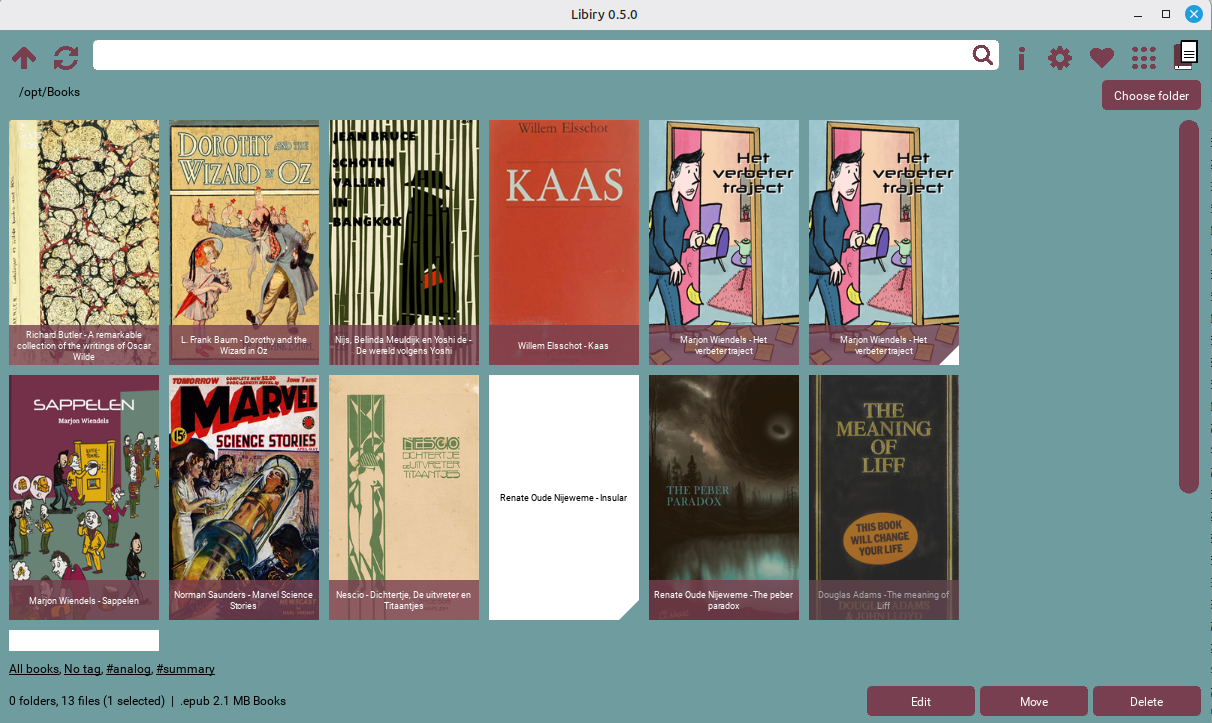
Key features
- Simple - No frills
- Visual grid display - See all your books in a cover grid
- No database required - Works directly on your existing folder structure
- Cross-platform - Windows and Linux. Future releases will become available for macOS and Android
- Offline support - Works without an internet connection
- Privacy-focused - No accounts, no tracking, no cloud dependency
- Fully customizeable - Colors, fonts, field names
- Quick tag filtering and editing in bulk
- Maintain your book data - cover, title, author, ISBN etcetera
- Handle any file type
- Find duplicate books
- Search - with optional fuzzy matching
- Format agnostic - Supports EPUB, MOBI, PDF, CBR, CBZ, Markdown, MP3 and more
- Works with Goodreads, Obsidian and Calibre - Import/export with Goodreads CSV format, files compatible with Obsidian (and its plugins), works on Calibre library
Visual book grid
Libiry displays your books as a grid of cover images, making it easy to browse your collection visually
Cover display
- Covers are automatically extracted from EPUB, PDF, MOBI and CBZ files
- An SQLite-based cache means fast loading
- When no cover is available, author + title are displayed
Visual indicators
- Accent color triangle - The book has a “summary” tag
- Background color triangle - The book has an “analog” tag (physical book)
- Folder icons - Navigable folder tiles
Search and navigation
Navigation
- Click Up to go to the parent folder
- Click Refresh to reload the current view
Tag management
Viewing tags
- Tags displayed in status bar
- Sorted by frequency (most common first)
- Click any tag to filter
Tag filtering
- “All books” or ”…”: Show everything
- “No tag”: Show books without any tags
- Click a tag to show only books with that tag
Editing tags
- Select one or more books
- Right-click or use context menu
- Click “Edit Tags”
- Add new tags or remove existing ones
Metadata are stored:
- EPUB - In the e-book file itself
- MOBI/AZW/AZW3 - In a sidecar file
- CBR - In a sidecar file
- CBZ - In ComicInfo.xml
- PDF - In file metadata or in a sidecar file
- Markdown - In the file content
When you want to, Libiry can store ALL metadata in markdown files instead
Duplicate detection
Find duplicate books in your collection:
- Click the Twins button
- Libiry scans all subfolders recursively
- Duplicates are detected by:
- Exact ISBN match
- Normalized title + author match
Normalization rules
- Removes articles: “The”, “A”, “An”, “De”, “Het”, “Een”
- Removes author suffixes: “Jr”, “Sr”, “PhD”
- Sorts author name parts alphabetically
- Case-insensitive comparison
File management
Move files
- Select files
- Right-click → Move
- Choose destination folder
Delete files
- Select files
- Right-click → Delete
- Confirm deletion
Files are moved to the system trash (recoverable) if the system settings allow that. Otherwise, they are permanently deleted.
Warnings
- Moving/deleting multiple files shows a warning
Customization
Colors
All colors are customizable:
- Background color
- Button color
- Button font color
- Search box color
- Tile font color
- Background font color
- Search box font color
Appearance
- Straight or rounded corners
- Scrollbar width
- Font size
- Hide or show book title
- Hide or show tags
File types
Configure which file types to display in selected types.txt
Metadata extraction
Supported formats
| Format | Cover | Title | Author | Tags | Other |
|---|---|---|---|---|---|
| EPUB | ✓ | ✓ | ✓ | ✓ | Full metadata |
| ✓ | ✓ | ✓ | ✓ | Full metadata | |
| CBZ | ✓ | ✓ | ✓ | ✓ | ComicInfo.xml |
| Markdown | ✓ | ✓ | ✓ | ✓ | All metadata in document |
| MOBI/AZW/CBR/Other | ✓ | ✓ | ✓ | ✓* | All metadata in OPF files |
Scanned formats
| Format | Metadata | Cover |
|---|---|---|
| EPUB | Full | Yes |
| MOBI/AZW | Full | Yes |
| Full | Yes | |
| CBR/CBZ | Basic | Yes |
| Markdown | Full | Yes |
| Other files | Filename only | No |
Markdown support
YAML Frontmatter (compatible with Obsidian):
---
cover: "cover.jpg"
booktitle: "The Book Title"
author: "Author Name"
tags: [fiction, fantasy]
---
Goodreads compatibility
Field names follow Goodreads CSV format:
booktitle→ Titleauthor→ Authorrating→ My Ratingtags→ Bookshelvesdescription→ My Reviewnotes→ Private Notes
All field names are configurable for compatibility with existing setups.
Digital independence
- No internet required. Libiry can be used both online and offline
- All data is stored on your own equipment
- The Libiry software is free and open source. You can use and customize it as you please
- Thanks to the Markdown format, you can use other tools to work with your book collection too
Performance features
- Instant loading of cover images, thanks to an SQLite-based cache
- Lazy loading - Only visible items are loaded
- Background scanning - UI stays responsive during scans
- Limited recursion - The search goes 10 folders deep, maximally